
Quick facts
- Status: In progress (Thermo UI is the daily driver; CLI still maintained; private GitLab)
- Product: Thermal ADHD (Thermo UI +
thermoCLI) - Stack: Python 3.11+, FastAPI, Uvicorn, React 18, Vite, TypeScript, pywebview;
python-escpos, PySerial, pyusb, Pillow - Transport: ESC/POS over USB or serial (no OS print driver)
- Platform: macOS-first (includes a real fix for USB
errno 13) - Read time: ~14 min
Context
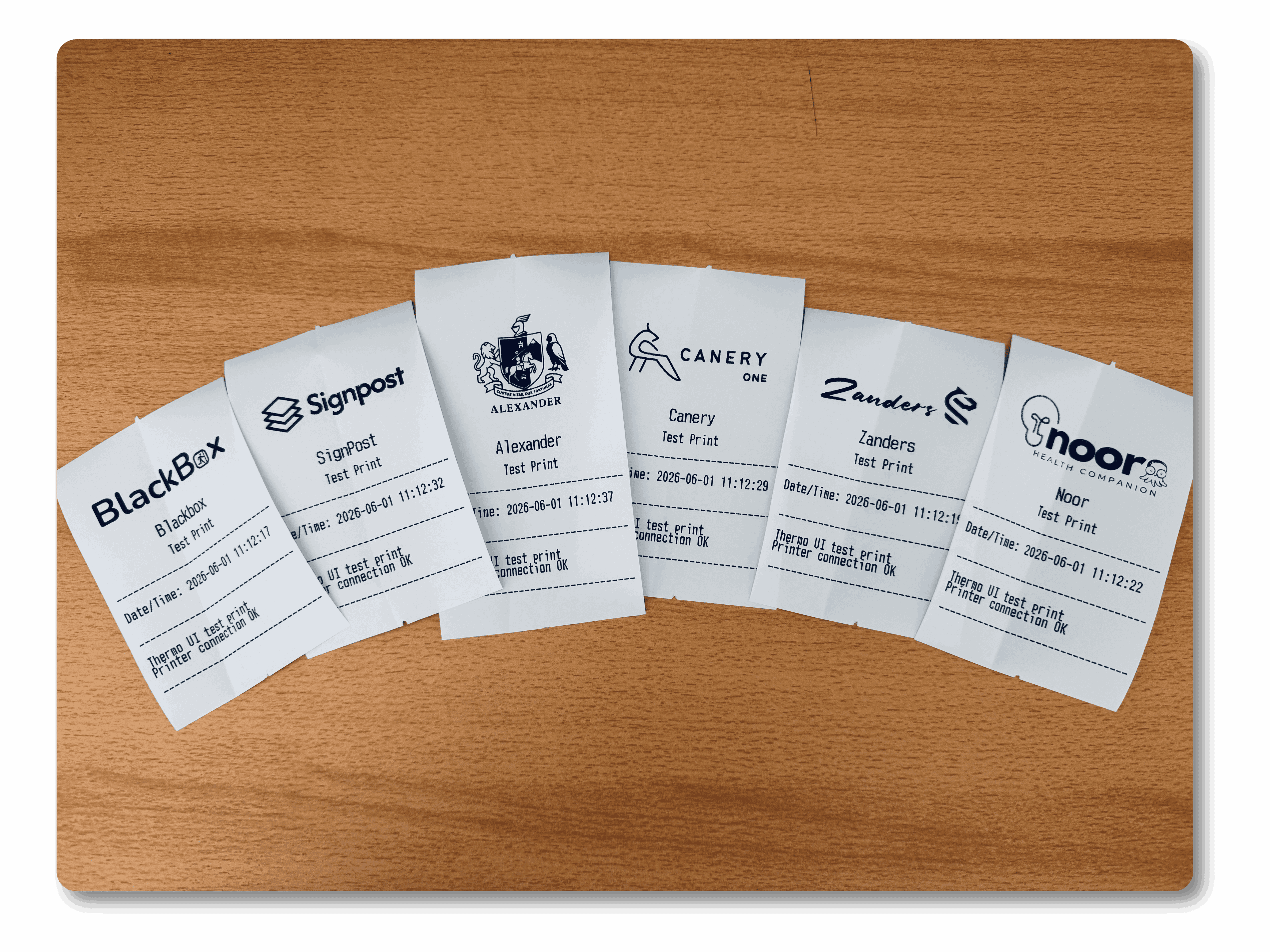
I wanted a physical workflow for focus: print a short todo list or a dev-note stub, put it on the desk, and stop juggling mental tabs. That turned into Thermal ADHD (Thermo): a local app that drives cheap 80mm thermal printers over ESC/POS, with separate todo and chore lists per client brand (Zanders Group, personal Alexander, Blackbox, SignPost, Canery).
The name is about the use case (paper breadcrumbs for ADHD-friendly focus), not a medical claim. I did not want another cloud todo product. I wanted something that works offline, survives USB weirdness on macOS, and lets me switch brand headers without reconfiguring the printer every afternoon
What I built or changed
Today there are two entry points:
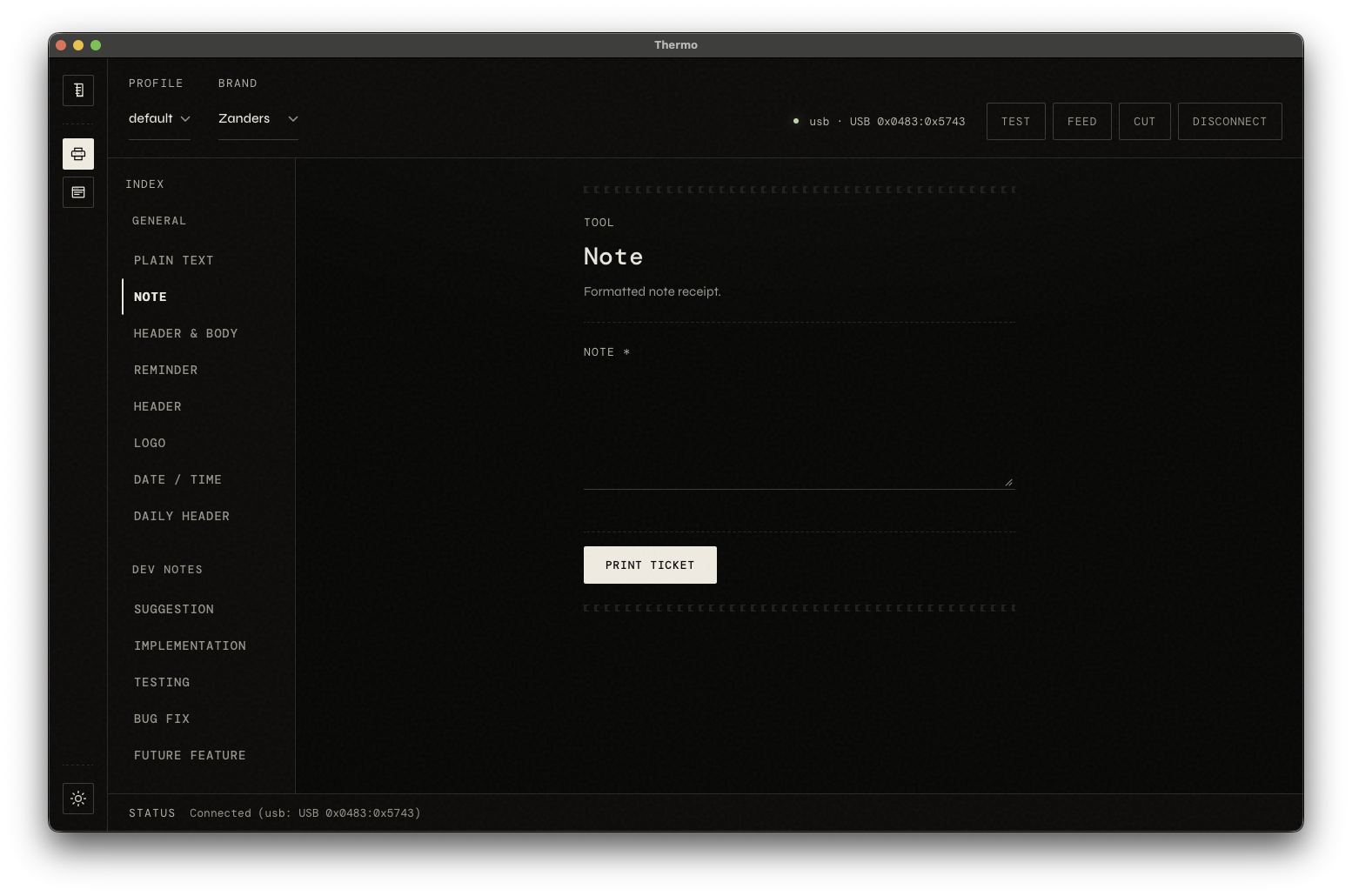
thermoCLI (thermal_adhd.py): a REPL and shortcuts (thermo zand,thermo bb, …) that call the same print templates directly.- Thermo UI: a small desktop shell. One launcher starts FastAPI, Vite, and a native window (pywebview, with a browser fallback).
./bin/thermo-uiThat script brings up uvicorn on 127.0.0.1:8765, Vite on 127.0.0.1:5173, and the UI. The React app talks to /api/*; Python owns the printer, brands, and JSON on disk.
flowchart TB
  react["React Vite SPA<br/>fetch /api/*"]
  fastapi["FastAPI ui/server.py"]
  registry["tool_registry.py"]
  actions["print_actions.py"]
  brands["brands_admin"]
  templates["templates.py + brands.py"]
  printer["printer_service.py<br/>USB or serial ESC/POS"]
  device["Thermal printer"]

  react -->|HTTP JSON| fastapi
  fastapi --> registry
  fastapi --> actions
  fastapi --> brands
  registry --> templates
  actions --> templates
  brands --> templates
  templates --> printer
  printer --> device
Under the hood I optimized for five things that kept coming back in real use:
- Local-first. No cloud API. State lives under
~/Library/Application Support/thermo/. - Printer-agnostic. A VID/PID table and serial path hints, not one Amazon SKU.
- CLI + UI parity. Shared
templates.pyandbrands.py; the UI adds HTTP and forms, not a second print language. - Multi-brand. Separate todo/chore files per brand; switch at runtime.
- macOS USB that actually releases the device. Custom
ThermoUsb.close()so the next print does not require unplugging the cable.
The rest of this post walks the stack in the order I had to get it working: transport, receipts, tools, API, UI, disk, then the mess I still need to clean up.
Talking to the printer (no CUPS, no vendor driver)
These printers do not speak PostScript. They speak ESC/POS. Thermo uses python-escpos on PyUSB / PySerial. I am not installing CUPS or a vendor driver on a headless Mac.
Known USB IDs and serial name hints are centralized in ui/backend/printer_service.py:
USB_PRINTER_IDS = ((0x0483, 0x5743), (0x0FD9, 0x006C))
_SERIAL_PORT_HINTS = (
    "usbserial",
    "usbmodem",
    "wchusbserial",
    "slab_usb",
    "ch341",
    "ch340",
)
Connection order when you hit Connect:
- Explicit USB VID/PID from the UI, if you set one.
- Auto-detect serial (device name matches a hint).
- Walk the USB ID list.
The week I lost to errno 13
On macOS, escpos.printer.Usb did not release the USB interface on close(). The first print worked. The second failed with “resource busy” until I physically unplugged the printer. That is not a workflow; that is a ritual.
I subclassed Usb and dispose libusb resources on teardown:
class ThermoUsb(Usb):
  """escpos Usb with working close() on macOS."""

  def open(self, raise_not_found: bool = True) -> None:
    super().open(raise_not_found)
    if not self.device:
      return
    self._device = self.device
    # detach kernel driver when needed ...

  def close(self) -> None:
    dev = getattr(self, "device", None)
    if not dev:
      self._device = False
      return
    try:
      import usb.util
      usb.util.dispose_resources(dev)
    except Exception:
      pass
    self.device = None
    self._device = False
FTDI-style devices (0x0FD9 / 0x006C) also needed explicit endpoints:
def _make_usb(vendor: int, product: int):
  if vendor == 0x0FD9 and product == 0x006C:
    return ThermoUsb(vendor, product, in_ep=0x81, out_ep=0x02)
  return ThermoUsb(vendor, product)
On quit, launch.py POSTs /api/printer/disconnect before stopping Uvicorn so nothing else inherits a stuck interface.
What actually prints on the receipt
templates.py
Headers, separators, timestamps, todo wrapping (about 32 characters wide), dev-note layouts, and per-chore tickets all live here. One example for todos:
def print_todo_list(printer, items: List[str], title: str = "TO-DO LIST"):
  print_header(printer, title)
  print_datetime(printer)
  print_separator(printer)
  for i, item in enumerate(items, 1):
    prefix = f"  {i}. "
    for ln in _wrap_todo_lines(prefix, item):
      printer.text(ln + "
")
  print_separator(printer)
  printer.cut()
Logos go through Pillow (dither, then raster graphics on the receipt).
brands.py
Presets (Alexander, Zanders, Blackbox, SignPost, Canery, …) set header_title, logo_path, separator width, font, and default chores. Custom brands and logos live under Application Support, not in git.
The CLI uses shortcuts and env (THERMO_START_BRAND). The API applies brand per print request:
def execute_tool(tool_id: str, payload: Dict[str, Any], brand_key: Optional[str] = None):
  with _print_lock:
    with brands.brand_lock():
      if brand_key:
        brands.apply_brand(brand_key)
      else:
        brands.ensure_current_brand()
      return _execute_tool_locked(tool_id, payload or {})
One registry instead of forty forms
I did not want a separate React form for every printable command. tool_registry.py returns JSON metadata; the UI renders fields from that.
{
  "id": "bug",
  "label": "Bug fix",
  "category": "Dev notes",
  "fields": [
    {"name": "text", "label": "Bug fix", "type": "textarea", "required": True},
  ],
},
{
  "id": "chores_print",
  "label": "Chores (print tickets)",
  "category": "Chores",
  "description": "Print each saved daily chore as its own ticket.",
  "fields": [],
},
Categories in the UI today: General, Dev notes, Todo, Chores, Printer. Dev-note tools use the same labels I already use in client repos (bug, feature, decision, …).
Adding a new printable action is usually one registry entry plus one branch in print_actions._execute_tool_locked, or a reuse of an existing template helper. The registry was worth it the moment React showed up. Before that, hard-coded forms would have rotted immediately.
The local API
ui/server.py is a small surface for the React app. Reference:
Method
Path
Role
GET
/api/health
Launcher readiness probe
GET
/api/state
Profile, active brand, connection
GET
/api/tools
Tool registry for dynamic forms
GET
/api/todos
Todo list for current profile + brand
GET
/api/chores
Chore template list
POST
/api/profile
Switch profile (default, home, work)
POST
/api/brand
Set active brand key
POST
/api/printer/connect
USB or serial connect
POST
/api/printer/disconnect
Release USB
POST
/api/print
Run tool by id + payload
The write path is intentionally boring:
@app.post("/api/print")
def api_print(body: PrintBody):
  result = print_actions.execute_tool(
    body.tool,
    body.payload,
    brand_key=body.brand,
  )
  return result
Example body:
{
  "tool": "bug",
  "brand": "zanders",
  "payload": {
    "text": "Receipt cut misaligned on FTDI adapter"
  }
}
HTTP codes: 400 unknown tool, 409 printer not connected, 500 print failure. A threading lock in print_actions stops overlapping ESC/POS writes when someone double-clicks Print.
The React shell
App.tsx loads state and tools, groups by category, and builds POST bodies from field metadata (CategoryDashboard.tsx / buildToolBody).
Typical flow:
GET /api/tools→ draw the form.POST /api/printwith{ tool, brand, payload }.- Show the API result string.
BrandsView.tsx handles brand CRUD and logo upload. Chores use ListEditor.tsx for list edits (no_print tools).
Stack: React 18, TypeScript, Vite. This is a local desktop app, not a Next.js site.
Where data lives
Nothing user-specific is in the repo. Paths come from config.py:
# ~/Library/Application Support/thermo/<profile>/todos/<brand>.json
# ~/Library/Application Support/thermo/<profile>/chores/<brand>.json
# ~/Library/Application Support/thermo/<profile>/state.json

def todos_path(brand_key: str, profile: Optional[str] = None) -> Path:
  safe = "".join(ch for ch in brand_key.lower() if ch.isalnum() or ch in ("-", "_"))
  return profile_dir(profile) / "todos" / f"{safe}.json"
On disk:
state.json: active brand for the profile.todos/<brand>.json: todo items withcompletedflags.chores/<brand>.json: daily chore templates.- Custom brand folders: logos and merged config.
todo_manager.py and chore_manager.py are shared by CLI and UI. Per-brand files were the right call: agency todos stay separate from personal lists on one laptop, even when the printer is shared.
The CLI I still depend on
thermal_adhd.py is the original REPL. Plain text prints as-is; commands hit the same templates. Brand shortcuts still matter for scripts and muscle memory.
When I shipped the UI, I copied printer_service from the CLI instead of refactoring the CLI in place. I did not want to break my own daily scripts mid-ship. Two copies of USB connection logic remain. That debt is real, and it is on the list below.
Challenges and trade-offs
ESC/POS without a print driver means we own USB edge cases ourselves (interface release, VID/PID guessing, serial quirks). It works on a headless Mac with no CUPS install. It also means every new printer family is our problem.
A declarative tool registry keeps the UI and CLI aligned on one form renderer. Every new tool still needs a Python handler behind it. The registry is not magic; it is discipline.
Copied printer_service let me ship the UI without destabilizing the CLI. The risk is drift between two connection implementations until I merge them.
pywebview + Vite avoids Electron for now. Local dev means two servers (API + front end). That is fine for me; it is not fine for a non-developer tester yet.
No receipt preview. Paper is the preview. Layout iteration burns real rolls. I would add on-screen preview earlier next time. Paper is cheap, but not free.
Private repo, local venv. This post is not an install guide. Packaging for anyone else is still open.
Household use is real. Zaynab prints Chores as separate tickets. I use Todo and dev-note tools and keep a paper ledger. The launcher waits for /api/health and Vite, opens the window, and disconnects the printer on quit.
Outcome
Shipped today:
- USB and serial connect with macOS-safe teardown.
- Branded receipts (logos, headers, dev-note templates, todos, chores).
- Thermo UI: dynamic tools, brand manager, profiles.
- FastAPI + React with typed tool metadata.
Still in progress:
- Backport newest UI tools to the CLI.
- Todo/chore editing fully in the UI (some paths still CLI-first).
- Receipt preview (PIL → base64 before
cut()). - Single packaged app instead of venv + two dev servers.
- One shared USB module for CLI and UI.
What I learned
- USB ownership is not a detail. I burned days on
errno 13before fixingclose(). I would treat “can we open the device twice in a row?” as a day-one test next time. - A data-driven tool registry paid off the moment the UI existed. Hard-coded forms would have been obsolete in a week.
- Per-brand storage stopped client todos from mixing with personal lists on one machine.
- Chores and todos are different print shapes. The registry should treat them that way from the start, not as an afterthought.
- Shipping a UI by copying connection code is a valid trade for a solo tool. Letting two copies drift is not. Merge them before adding a third surface.
Next steps
- Merge printer connection code between CLI and UI.
- Add on-screen preview before
cut(). - Package for non-developer testers (no venv, no twin dev servers).
- Publish sibling posts in the pre-launch batch (
[LINK: blackbox-plans],[LINK: signpost-post], etc.).
Footnotes
Hardware. Generic Xprinter 80mm USB thermal (Amazon; internal SKU 400-613-9828). Thermo targets ESC/POS hardware with compatible USB IDs or serial profiles. Amazon affiliate: [AMAZON_AFFILIATE_LINK].
Software. Private GitLab; local only today. May open-source or add tips after packaging.

Comments
Comments are turned off site-wide. Editors and admins can enable them again under Admin CMS.